Monday, September 4, 2017

FAQ 3 - How do I upload the Assignment?

Hi Students!

You guys are so great and have so many awesome questions, so I uploaded the answer so everyone can see it.


1) Question: Can I email you or text you my assignment to have it count on my grade?
Answer: I am so sorry but the answer is "NO".  You see, there is no way for me to link my text messages and email messages to the K12 grade-book.  That technology simply doesn't exist.  From now on, even if it is done, it will not receive a grade until it is uploaded into the OMS (Online Middle School) /K12

Here is an answer to our FAQ (Frequently Asked Question): How do I upload the assignment?

The homework assignment is located on our K12 online middle school login.  I put all of our assignments and exit tickets there.   I have attached some pictures to help you out.

1)      Login to your students’ K12
2)      Go to the bookmark bar and click on the book to enter students’ classes
3)      Click class -> Science
4)      Look at the “Class Plan” menu, the assignment and due date are listed.   Click on the assignment.
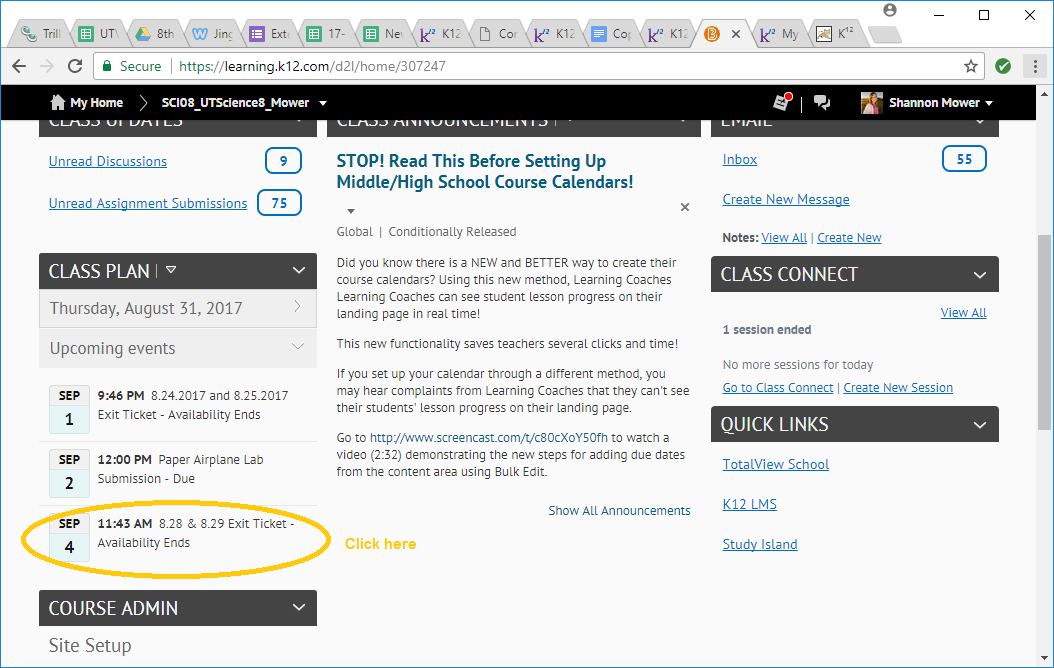

5)      The assignment submission box will open.  Click on the blue box.


6)      A file submittal screen will open.  Select your file and click “Submit”.  You may need to scroll down your screen to find this button.


Previously, I sent a movie to this email walking through the process.  Also, the process was shown twice in class and will be on today’s recording.  https://safeshare.tv/x/DYjH__RUbWI

You will submit all of your assignments this way.

Have a nice day!

FAQ 2 - Problems With the Exit Ticket Password

Howdy Y'All!


Here are 2 more great questions:

1) Question:  Where do I get a copy of today's exit ticket password?
  Answer: At the end of today's recording.  To be fair to students who attend class, I will not simply email you the password, you will have to watch to the end of the day's recording.

2) Question:  Please help, my password doesn't work!?!
Answer:  Please know that I test every password before I set it in the system and by the time I get this question asked, many students have already successfully completed the exit ticket quiz.  There may be a few things that could be going wrong:

  • Did you look to see if you are using the right password on the right quiz?   Each quiz has a unique, new and different password.  One password does not work on all of them.  Most students who can't get in are using the wrong password for that quiz.
  • Is your "Caps Lock" on?  All passwords are case sensitive.
  • Did you use spacing?
  • Did you type in the number instead of the numeral (example "four" instead of "4")?
  • I came to class but I wrote it down wrong?  Well, you can email me and I will check my attendance records.  If you did come to class, I will send you the password, but if not, you will be asked to watch the recording, after all, what good is taking a quiz if I have not taught you the answers yet?  :)
  • Are you using the right browser?  You should use Firefox as Chrome does not update the Flash Player.

I BELIEVE IN YOU!  YOU'VE GOT THIS!  YOU CAN DO IT!  HAVE AN AWESOME DAY!


FAQ 1 - How to find my "Exit Ticket"

Hello Everyone!

You matter and you are awesome!

Many of you have asked the same question and to ensure that everyone has equal access to the same answers and fair treatment, I started a blog to post all of your "Frequently Asked Quesitons" or FAQ's.

Today's question is "Where do I find the exit ticket?"

Class exit tickets will be labeled with the date of class and will be found in the OMS (Onine Middle School).

You get to it by:

1) Log into K12
2) Go to your bookmark bar, scroll down and click on "courses" (the book icon).
3) Click on your science class.
4) There are 2 places to get your exit ticket:  You can go to "Content" and select "Class Exit Tickets and Recordings" then select today's date.


OR

Go to "Class Plan" and click on the date that it is due.  The Exit Ticket Quiz will automatically open.

AWESOME QUESTION GUYS!   I'LL SEE YOU IN CLASS!